
What is MCP triple-connect?
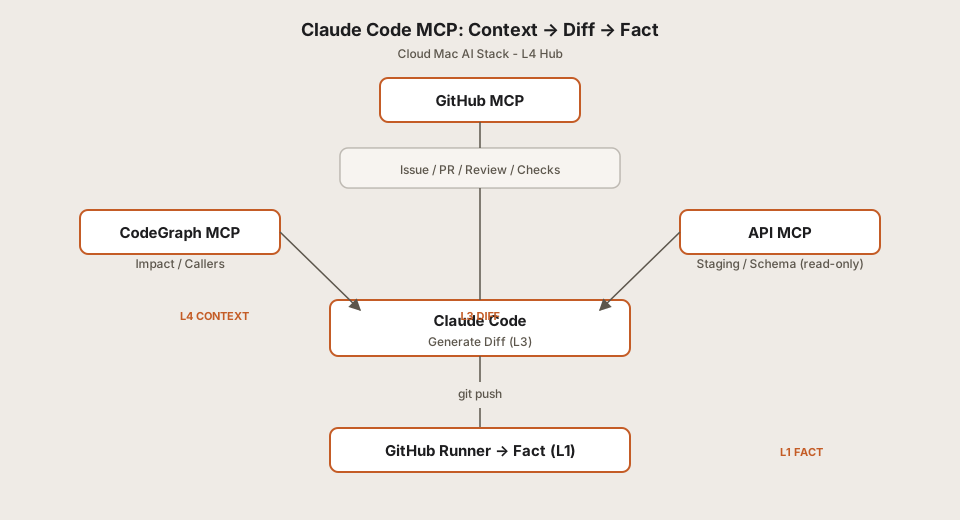
Claude Code MCP uses the MCP protocol to bring GitHub (issues and intent), CodeGraph (repo structure and blast radius), and APIs (environment and ground truth) into Claude Code so the agent can see what to do, what to change, and whether it is right—we call that triple-connect.
This page is the Cloud Mac AI Stack overview for MCP: one diagram for the big picture, then links to the setup guide, architecture article, or CodeGraph walkthrough. Commands and troubleshooting stay in those articles. The previous L2 post: parallel memory scheduling.
Why several articles instead of one long post
Readers arrive in different modes: some need the environment working now; others want to know why GitHub and CodeGraph belong together; others care most about tokens and permissions. Packing install steps, theory, and permission checklists into one URL forces people hunting for JSON to scroll past long mcpServers blocks, and interrupts anyone who only wants the map first.
So we split by task: this page shows what each piece does in one diagram; open the setup guide when you are ready to wire things up; read the architecture article when you need to explain the design to your team. Treat this as the front door—pick the next article from here.
What this page does in the series
Think of this as the table of contents for MCP triple-connect: see how the pieces fit, then open the article that matches your job. It does not run installs for you, and it is not a substitute for the CodeGraph or Runner guides.
This page does not include:
- Step-by-step Claude Code MCP install (no copy-paste command walkthrough)
- Long architecture derivations or Context Engineering theory
- Deploying or operating CodeGraph on its own (see CodeGraph in five minutes)
This page does help you pick the next read based on your goal or symptom—setup, architecture, graph, Runner, runtime, or permissions.
Not here—open the right article
If you need what is in the left column, use “Go to” instead of hunting for steps on this overview.
| You might be looking for… | Not on this page | Read instead |
|---|---|---|
Install commands and mcpServers examples |
No step-by-step tutorial | Setup guide |
Full ~/.claude.json samples and how to fill a GitHub PAT |
No full config walkthrough | Setup guide |
MCP tool errors or empty codegraph_impact |
No troubleshooting steps | Setup guide · problem lookup table |
| Why Context → Diff → Fact is layered this way | No long theory article | Architecture article |
| Green CI checks after push and Runner registration | Outside MCP install scope | GitHub Runner guide |
Quick navigation: what to read next
Pick one topic that matches your goal; scenario shortcuts and symptom tables below go deeper.
| I want to… | Read | What's inside |
|---|---|---|
| Get MCP working in chat | Setup guide | Configure · verify · common errors |
| Understand why GitHub / graph / API together | Architecture article | Layers · workflow · trade-offs |
| Deploy repo graph (CodeGraph) only | CodeGraph in five minutes | Graph MCP on its own |
| Tighten tokens, read-only API, permission boundaries | Permissions guide | Least privilege · environment isolation |
Need green CI checks after a push? See GitHub Runner guide. Lid closed and MCP drops or the index goes stale? See Cloud Mac vs local Mac
What are you trying to do?
People search with different keywords, but goals usually fall into four buckets. Pick yours to save time.
① Get the environment running
People often search for: Claude Code MCP setup · install MCP server · configure GitHub MCP · connect Claude Code to GitHub
Your goal: Run the toolchain and see mcp__* tools in Claude Code.
Suggested read Setup guide
② Understand the overall design
People often search for: MCP architecture explained · Context Diff Fact · why MCP needed
Your goal: Understand the layers and align your team.
Suggested read Architecture article
③ Repo graph / impact analysis only
People often search for: CodeGraph MCP · codegraph_impact · repo graph Claude Code
Your goal: Wire the graph first; GitHub issue flow can wait.
Suggested read CodeGraph in five minutes; for full triple-connect later see Setup guide
④ Permissions and safety
People often search for: MCP permissions · token scope · read-only API MCP
Your goal: Control token scope, isolate writable tools, keep staging read-only.
Suggested read Permissions guide; for a minimal working setup first, follow the setup guide, then tighten permissions
Still unsure? Use quick navigation or the problem lookup table below.
Common scenarios—start here
Same triple-connect, different entry points—choose the line that sounds like you.
- First time with MCP: skim this diagram → setup guide
- CodeGraph is already running; add GitHub → setup guide (GitHub section); graph stays in CodeGraph in five minutes
- CI: green checks after push → GitHub Runner guide; how MCP and Runner differ → architecture article
- Tightening tokens, env vars, read-only API → Permissions guide; interim minimal connect via setup guide
- Installed but tools missing or flaky → setup guide · troubleshooting
- Architecture only—no install yet → architecture article
Something wrong? Match your symptom
Symptoms below point to the article that usually helps. Root-cause detail and commands live there—not on this overview.
| What you're seeing | Usually involves | Suggested read |
|---|---|---|
Claude Code cannot see GitHub issues / no mcp__github__* |
GitHub context not wired | Setup guide |
codegraph_impact empty / no CodeGraph in MCP tools |
Graph index or working directory | Setup guide · CodeGraph in five minutes |
| Code changed but CI fails / no green Checks | CI / verification | GitHub Runner guide |
| Unsure which files to change / agent greps the whole repo | Missing code context | CodeGraph in five minutes → Setup guide |
Staging or API responses do not match expectations; guessing .env |
Environment / ground truth (API) | Architecture article · connect via Setup guide |
| MCP still unusable after setup | Config / troubleshooting | Setup guide |
| MCP drops after closing the laptop lid / index invalid | Runtime (local vs cloud) | Cloud Mac vs local Mac |
| MCP over-permissioned / token exposure / writable API risk | Permissions / security | Permissions guide |
| Can I use MCP without GitHub Runner? | MCP vs CI roles | Architecture article + Runner guide |
Three common reading paths
First contact with MCP
Open Claude Code → read this overview (triple-connect) → follow the setup guide for mcpServers and confirm tools in chat → add the GitHub Runner guide when you want checks after push.
Graph is done—add GitHub only
Finished CodeGraph in five minutes → return here to place GitHub in the map → wire GitHub MCP in the setup guide → optional architecture article for boundaries.
Team rollout: AI-assisted CI
This overview → setup guide (triple-connect) → Runner guide (automated checks) → architecture article (team alignment) → Permissions guide to tighten tokens.
One diagram, clear roles
GitHub      = intent
CodeGraph   = context
API         = truth
Claude Code = diff
Runner      = fact
FAQ
| Question | Read |
|---|---|
| MCP not working after setup? | Setup guide |
Why is codegraph_impact empty? |
Setup guide |
| Can I use MCP without GitHub Runner? | Architecture article |
| How do I connect GitHub to Claude Code? | Setup guide |
| How should I think about the overall MCP architecture? | Architecture article |
| How do I tighten token permissions? | Permissions guide |
Bookmark this page as your MCP triple-connect starting point. English slug: claude-code-mcp-github-files-api-chain.
Cloud Mac AI Stack · MCP triple-connect
What to read next
Setup guide · Architecture article · CodeGraph in five minutes · Cloud Mac pricing
Back to blog · full Cloud Mac AI Stack series