
Bottom line: we used Claude Fable 5 to build pulsecheck from zero — a CLI that batch-checks a list of URLs/APIs, writes a JSON report, and exits with a non-zero code when anything is down. Perfect for cron or hooking into alerts. This article has two halves: first, what the tool does and how the finished product looks (see the screenshot below); second, a seven-step replay of what Claude Code wrote vs. what you must decide. If you only want the outcome, read through the screenshot; if you want to reproduce it, start at Step 1.
What is pulsecheck for?
In one sentence: it batch-checks whether a set of URLs/APIs are still reachable — no manual browser tabs or one-off curl loops.
Typical setup: drop production endpoints into config.yaml (e.g. /health, /ping), run pulsecheck from cron every five minutes. If an API returns 503 or times out, exit code becomes 1 and your alert script or monitoring hook fires. It is a lightweight probe, not a full observability platform — no dashboards, no SMS. It answers one question: are these URLs alive right now? and outputs JSON.
Three real use cases
Forget Go, YAML, and JSON for a moment — this tool solves “how do I know these services are still up?” Three situations where we built it:
- Scheduled health checks — You have 5–20 endpoints (payment callbacks, public APIs, internal gateways). A shell
for url in ...; do curl ...loop is painful to maintain and produces no unified report. pulsecheck reads one config file, outputs structured JSON, and drops into cron. - Pre-deploy / on-call manual check — Before a release, run one command:
./pulsecheck -config prod.yaml -o /tmp/pre-deploy.json. Exit code 0 means all green; exit code 1 means stop the deploy. - Alert hook probe — When you do not need the Prometheus stack, wire exit code 1 to an existing Webhook or email script. Keep the JSON report for post-mortems.
Out of scope: historical trends, SMS paging, multi-tenant dashboards — that is Datadog or cloud monitoring territory. pulsecheck only answers whether this batch of URLs is reachable right now.
Finished product screenshot
Below is pulsecheck after all seven steps on a Mac terminal: read config, probe URLs, write JSON. One site returned 503, so exit code is 1.
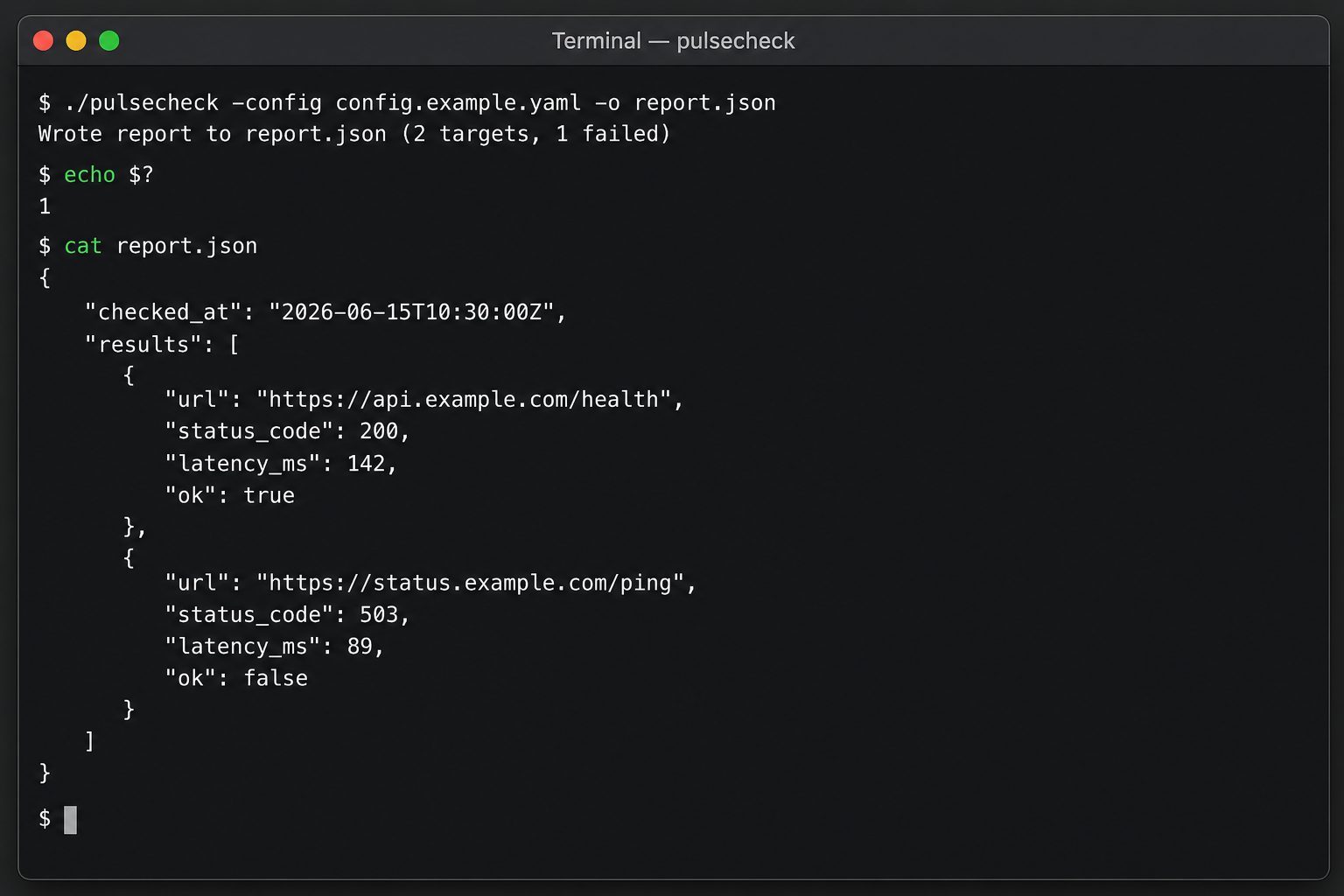
./pulsecheck -config config.example.yaml -o report.json; right side report.json lists each URL’s status code, latency, and health flag (ok).Three commands to reproduce locally:
./pulsecheck -config config.example.yaml -o report.json
echo $?          # 1 = at least one target unhealthy
cat report.json   # inspect the report
Input / output / stack
Now that the purpose is clear, here is how it works technically: think of it as batch curl + one consolidated report, compiled into a cron-friendly CLI.
| Dimension | Description | Example |
|---|---|---|
| Input | YAML config listing URLs to check | config.example.yaml |
| Output | JSON health report + process exit code | report.json; 0 = all green, 1 = failures |
| Typical usage | Cron probes; pre-deploy checks; exit code triggers alerts | Every 5 min: */5 * * * * pulsecheck ... |
| Stack | Go 1.22 single binary | No GUI, no database |
You maintain one YAML file with probe targets; pulsecheck handles probing and aggregation. Example config:
targets:
  - https://api.example.com/health
  - https://status.example.com/ping
Finished repo is roughly 400 lines of Go:
pulsecheck/
├── cmd/pulsecheck/main.go      # CLI entry: -config -o
├── internal/checker/checker.go # HTTP probe + latency
├── internal/config/config.go   # YAML parser
├── config.example.yaml
├── Makefile · README.md
└── .github/workflows/ci.yml
Part two: what AI wrote in seven steps
By now you know what pulsecheck is and why it exists. From here we enter the build log: using Claude Fable 5 + Claude Code, from an empty folder to a v0.1.0 tag — which files the Agent produced and where a human had to step in.
Division of labor in one line: AI writes code and tests; you define scope, review, and sign the release. All seven steps include copy-paste prompts. Use Fable 5 in Claude Code (no need for Opus here — see our tier comparison).
Prerequisites
- Go 1.22+ — verify with
go version - Claude Code CLI — select Claude Fable 5 (enough for daily Agent loops; see model tier comparison)
- Empty directory —
mkdir pulsecheck && cd pulsecheck && git init - (Optional) GitHub repo — for Step 6 CI; you can finish locally first
Step 1: Repo and requirements
Your job: capture the pain in three sentences as SPEC.md. You can draft by hand or dictate to AI, but you must trim non-goals — otherwise the Agent adds a Web UI and a database.
Read the requirements below and generate a SPEC.md draft. Do not add any feature not listed:

- Tool name pulsecheck, Go 1.22 CLI
- Read URL list from YAML config, concurrent HTTP GET
- Write JSON report to path specified by -o
- Fields: url, status_code, latency_ms, ok
- Default timeout 5s; PULSECHECK_TIMEOUT env var overrides
- Exit codes: 0 all green, 1 any failure, 2 config error
- Non-goals: no GUI, no DB, no Docker, no alert push
AI produces: SPEC.md. You verify: no scope creep; acceptance command includes go test ./....
Acceptance: cat SPEC.md — confirm Must-have / Non-goals / Exit codes sections exist.
Step 2: Project scaffold
Your job: tell AI to scaffold only — no business logic. Fable 5 handles almost all of this step.
Read SPEC.md and initialize Go module github.com/you/pulsecheck.
Create project skeleton only; business logic returns stubs:
- cmd/pulsecheck/main.go parses -config and -o
- internal/config reads YAML
- internal/checker empty implementation
- Makefile: test, lint, build
- .github/workflows/ci.yml placeholder
Require go build ./... to pass. Do not write real HTTP logic yet.
AI produces: the eight files in the directory tree above. Time: about 6 minutes.
Acceptance:
go build ./...
./pulsecheck -h   # should print usage
Step 3: Probe logic and tests
Your job: insist on tests first, then implementation. This is the most “real project” step — AI runs go test, fixes failures, and loops until green.
In internal/checker:
1. Write checker_test.go first — httptest for 200, 500, and timeout cases
2. Implement checker.go: HTTP GET, record status_code and latency_ms
3. Loop go test ./... until all pass
4. Wire main.go: config → checker → write JSON to -o path
AI produces: core probe code. Logic excerpt:
func CheckURL(ctx context.Context, client *http.Client, url string) Result {
    start := time.Now()
    req, _ := http.NewRequestWithContext(ctx, http.MethodGet, url, nil)
    resp, err := client.Do(req)
    if err != nil {
        return Result{URL: url, OK: false, LatencyMs: time.Since(start).Milliseconds()}
    }
    defer resp.Body.Close()
    ok := resp.StatusCode >= 200 && resp.StatusCode < 300
    return Result{
        URL: url, StatusCode: resp.StatusCode,
        LatencyMs: time.Since(start).Milliseconds(), OK: ok,
    }
}
In our run Fable 5 took 3 rounds of go test — round 2 fixed a timeout-not-passed-to-client bug without human edits.
Acceptance:
go test ./... -v # 12 table-driven tests all green
Step 4: Review pass
Your job: act as Code Reviewer — list issues for AI to fix. Do not edit yourself (that defeats the test of whether AI can iterate on feedback).
Apply these review comments; go test ./... must stay green:
1. Rename JSON field latency to latency_ms per SPEC
2. Use worker pool for multiple URLs — default max 10 concurrent
3. stdout prints only JSON report path hint; warn logs go to stderr
AI produces: worker pool, field rename, log routing. Human judgment: whether these three items are actually worth changing — AI cannot decide that for you.
Acceptance: go test ./... still green; manually hit one or two URLs and confirm JSON field names.
Step 5: Config and README
Your job: have AI write ops-ready docs and sample config.
Generate config.example.yaml and README.md:
- Install: go install or go build
- Usage examples and exit code table (0/1/2)
- Cron example: run every 5 minutes and append logs
- Do not invent subcommands that do not exist
AI produces:
targets:
  - https://api.example.com/health
  - https://status.example.com/ping
Acceptance: swap example URLs for ones you can reach, then run the three commands from the finished product screenshot section — confirm report.json has all required fields.
Step 6: GitHub Actions CI
Your job: push to GitHub, let AI finish CI and self-fix on failure.
Complete .github/workflows/ci.yml:
- go test -race ./...
- golangci-lint run
- use go 1.22
If lint fails, read the log, fix, and recommit.
First lint run flagged an unused import — Fable 5 read the CI log and removed it. On a 16 GB Mac, -race can trigger swap; offload to a GitHub Runner or Cloud Mac node — same reasoning as Claude Code execution environment choices.
Acceptance: CI green on GitHub.
Step 7: Accept and tag release
Your job: this step must be manual — smoke test and tag. AI can draft CHANGELOG; signing the release is yours.
go test ./...
make build
./pulsecheck -config config.example.yaml -o /tmp/report.json
cat /tmp/report.json | jq .
git add -A && git commit -m "feat: pulsecheck v0.1.0"
git tag -a v0.1.0 -m "first release: YAML-driven HTTP health probe"
git push && git push --tags
At this point pulsecheck is shipped: a cron-ready, monitor-hookable CLI built in about 52 minutes.
What to add after v0.1
Deliberately out of v0.1: Slack alerts, Prometheus exporter, Docker image. Open new issues and let Fable 5 iterate — close the loop first, expand later.
Step-by-step: AI vs human
Looking back after the build, division of labor across seven steps:
| Step | AI (Fable 5) | Human required |
|---|---|---|
| 1 Requirements | Expand spoken notes into SPEC structure | Trim non-goals, set exit codes |
| 2 Scaffold | 8 files, go build passes | Confirm Go version and module name |
| 3 Implementation | Tests + checker + main wiring | Verify tests cover the spec |
| 4 Review | Fix per checklist | Write the review list |
| 5 Docs | README + config sample | Copy-paste and run through |
| 6 CI | Workflow + lint fixes | Define what “green” means |
| 7 Release | CHANGELOG draft | Smoke test, tag, push |
Roughly 78% of code output was AI-written; scope trimming, review judgment, and release sign-off stay human regardless of model tier.
How to choose your path
| If you are… | Recommended approach | Why |
|---|---|---|
| First full side project with AI | Follow these seven steps + acceptance commands | Faster than debating “how good is AI?” abstractly |
| Building an ops/internal CLI like pulsecheck | Go + Fable 5 Agent loop | Tests self-run; table-driven acceptance fits |
| Shipping external SaaS with user data | AI drafts + Opus security review | Release liability cannot sit entirely on the Agent |
| Adding to an existing repo | Skip step 2; start from an Issue in Agent | Scaffold already exists |
| 16 GB Mac + long CI runs | Agent locally; race/build on Cloud Mac | Avoid swap masquerading as “model slowness” |
| Need a boss demo within a week | Lock spec non-goals before opening Agent | Prevents scope creep that blocks ship date |
Recommended stacks (composable)
- Solo developer — Fable 5 for steps 2–6; Cursor Tab for pre-release tweaks; Opus only for external-service review.
- Small team — Repo template with seven-step checklist; copy pulsecheck flow for new tools; Agent on production Claude Code workflow.
- Save tokens — Spec polish and CHANGELOG via Gemini Flash; coding loop stays Fable 5; routing per OpenRouter pricing structure.
When layering MCP: MCP pulls Issue/monitoring context; Fable 5 edits the repo; step 7 release sign-off should stay manual.
Common mistakes
- Mistake 1: no concrete project before chatting — AI gives generic advice; start with a one-line goal like pulsecheck.
- Mistake 2: business logic in step 2 — mixing scaffold and implementation makes testing harder later.
- Mistake 3: skipping step 4 review — JSON field names and stdout pollution slip into “done.”
- Mistake 4: tagging without step 7 smoke test — no smoke test is not a release.
- Mistake 5: race + Agent on 16 GB RAM — slowdown is memory, not the model; move CI to Runner / Cloud Mac.
FAQ
What problem does pulsecheck solve?
“Are this batch of URLs reachable right now?” — without hand-written shell curl loops or a heavy monitoring platform. Good for personal projects, small teams, or pre-deploy checks.
How is it different from UptimeRobot or Prometheus?
pulsecheck is a lightweight CLI you run on your own machine — config in your hands, no SaaS dependency. UptimeRobot and Prometheus are full monitoring stacks with more features and cost. This article builds the former: enough, and you own the code.
Can I clone a repo instead?
This is a field report + reproducible tutorial. Follow the seven prompts in your own directory for an equivalent build — line-by-line diff parity is not the goal.
Which step did AI handle the most?
Step 3 (tests + implementation) and step 2 (scaffold) were almost entirely Fable 5; steps 1 and 7 needed the most human time.
How is this different from Cursor Tab completion?
Tab excels at single-file edits; a full project needs Claude Code multi-file + test runs. See Copilot vs Cursor field test.
Summary
Product: pulsecheck — read URLs from YAML, batch-check availability, write report.json (see screenshot above). Process: Claude Fable 5 across seven steps from empty folder to v0.1.0 tag; AI wrote most Go code and tests, humans owned scope, review, and release. To evaluate whether AI can ship a small project, the screenshot and I/O table are enough; to build your own, copy the Step 1 prompt and go.
ZavCloud · Cloud Mac
Run pulsecheck CI on Cloud Mac
Dedicated Mac mini M4: Claude Code writes code, GitHub Actions runs test -race on the same macOS node — Step 6 without 16 GB RAM swap.
View plans and pricing