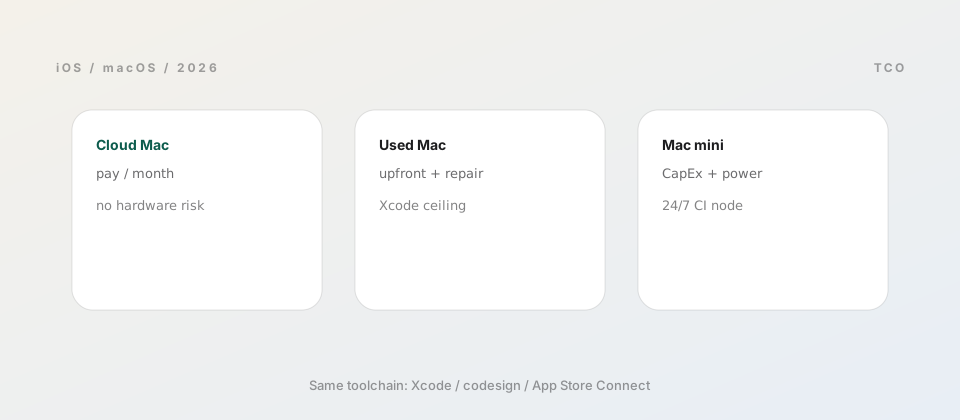
In one line: threads on “do I need a Mac for iOS?” split into “buy a Mac mini” vs “rent cloud Mac”—yet few posts put your monthly macOS hours, release cadence, and hidden costs on the same spreadsheet. Below we separate “you need macOS” from “you must buy hardware,” then compare cloud Mac, used Macs, a new Mac mini, and hybrid CI by total cost of ownership—with a table you can map to your situation.
Do you have to buy a Mac? Apple’s hard requirements
Shipping an iOS app means running Apple’s toolchain on macOS: Xcode, xcodebuild, Simulator (or device flows), codesigning, and upload to App Store Connect. You can write Swift, Flutter, or React Native on Windows or Linux, but the final iOS artifact is produced on macOS—a platform and certificate constraint, not a preference debate.
The sharper question is where macOS compute lives, who maintains it, and how you pay for it. A desk Mac mini, a used MacBook, monthly cloud Mac, or a CI macOS runner all answer that. For cloud vs buying a mini specifically, see cloud Mac server vs Mac mini; this article adds used hardware and hybrid pipelines to the same cost frame.
Separate from hardware: the Apple Developer Program annual fee is required for App Store and TestFlight. Every option below still pays that; the table treats macOS compute only.
What “cheapest” means: CapEx, OpEx, opportunity cost
Three accounting lenses often disagree:
- First-year cash: Cloud Mac usually wins—no large upfront, good for experiments.
- Cost per active macOS hour: Longer use favors owning (especially a shared Mac mini).
- Opportunity cost: Remote latency, used-machine repairs, and self-hosted Runner time are “shadow OpEx.”
Estimate honestly: how many hours per month you need full Xcode + Simulator, not just one flutter build ios. Hobby ~20h/mo vs full-time ~160h/mo often pick opposite winners. For a broader map of Windows-centric paths, see cloud Mac iOS builds from Windows.
Option 1: Cloud Mac (rent / remote desktop)
Best for: Trying iOS short-term, shipping one app while your daily driver is Windows/Linux, or outsourcing the Xcode environment.
Cost: Monthly or tiered OpEx; vendor supplies macOS and remote access. Dedicated Apple Silicon suits long compiles and Simulator; shared tiers are cheaper but peaky.
Pros: No depreciation; easy RAM upgrades; pairs with cloud Mac iOS builds from Windows. Cons: Network latency; 24/7 compile months can approach Mac mini amortization.
Save money
Code on Windows daily; power cloud Mac only for Archive or native debugging. Use Git pushes instead of leaving a session open 24/7.
Option 2: Used Mac / older MacBook
Best for: Tight budget, personal apps, learning SwiftUI—if you accept maintenance and older Xcode ceilings.
Cost: Upfront purchase + SSD/battery repairs + power. 8GB Intel machines struggle with 2026 Xcode and large simulators; used Apple Silicon (M1+) is the practical floor.
Pros: Year-one cash can beat 12 months of cloud rent; zero remote lag. Cons: No warranty, hidden faults, macOS version caps lock out new Xcode; poor shared CI target.
Option 3: New Mac mini (local build node)
Best for: Long-lived iOS products, stable CI, or 2–5 people sharing one sign/build machine—aligned with Mac mini vs cloud Mac for teams.
Cost: Hardware + peripherals + power + backups. M-series minis usually beat similarly priced used laptops on compile watts.
Pros: 24/7 GitHub self-hosted runner, local Simulator, full control of certs. Cons: High upfront; travel needs VPN or a cloud fallback; you patch macOS.
Option 4: Hybrid workflow + CI
Best for: Flutter/RN repos with Linux CI for backend tests but macOS-only iOS jobs.
Pattern: develop on Windows → push triggers macOS Runner for xcodebuild test → scheduled or manual Archive for release. Compute can be one Mac mini or burst cloud Mac; certs and Runner must share a trust boundary. Often cheaper than all-cloud desktops or everyone on a MacBook Pro.
Side-by-side comparison (2026 ballpark)
Orders of magnitude only—verify live pricing before buying.
| Option | Year-one cash (order) | Typical macOS hours/mo | Main risk |
|---|---|---|---|
| Cloud Mac (dedicated) | Mid–high OpEx, low CapEx | < 40–60h or spiky | Rent adds up, latency |
| Used Apple Silicon | Low–mid CapEx | 40–120h solo | Failures, Xcode ceiling |
| New Mac mini | High CapEx, low OpEx | > 80h or team share | Upfront, ops burden |
| Hybrid + CI | Mid (Runner + some cloud) | Cross-platform teams | Pipeline + cert complexity |
Pick by scenario
- First App Store ship: Start cloud monthly; buy mini after the pipeline is proven.
- Student / nights & weekends: Used M1 Air 16GB or short cloud bursts—avoid 8GB Intel.
- Indie, frequent TestFlight: Mac mini vs long-term cloud—pick by travel and home bandwidth.
- Small team, one iOS lane: One Mac mini Runner; devs may stay on Windows.
- Flutter-heavy, iOS is 10% of time: Windows + on-demand cloud build beats Mac for everyone.
FAQ
Minimal native code—still need Mac? Yes for Archive/signing unless you pay a hosted build service (still macOS somewhere).
Cloud Mac vs Hackintosh? For store and teams, use licensed macOS (cloud or real hardware). Hackintoshes trade support and upgrade risk for upfront savings—not a business default.
Cheapest Mac mini config? Prioritize RAM (16GB minimum; 24GB if Simulator + agents run together), then storage. See Mac mini vs cloud Mac for teams for when local hardware pays off.
Already have a Windows desktop—need a MacBook too? Usually not. Windows + cloud Mac or Windows + one Mac mini builder is the common cost-saving pair.
ZavCloud Developer Infrastructure
Prove the ship path, then park Xcode on dedicated macOS
Monthly cloud Mac fits experiments; steady releases may shift to a Mac mini or long-term cloud node.
Code on Windows, Archive remotely—cheaper than a MacBook for everyone.