I thought 16GB plus an external SSD would be enough for Ollama on a budget. Then I used the Mac mini as a real daily driver — Chrome with about twenty tabs, VS Code, Slack or Teams, and qwen3:8b always loaded. Within a week, Activity Monitor showed yellow memory pressure and swap parked around 1GB. A colleague’s 24GB box, same model, same scripts: green pressure bar.
This is not a spec-sheet repost. It is a seven-day A/B on two M4 Mac minis (16GB vs 24GB): what we measured, how we measured it, and where the numbers came from. I also map Qwen3, DeepSeek R1, and Gemma 3 for 2026, and what happens when you stack OpenHuman, Claude Code, or MLX on top of a “normal” dev desktop.
Cluster roles: standardized 7B/14B tok/s and swap tables live in the M4 Ollama performance benchmark (primary SEO page); this post is the buy-story and week-long diary—so we do not compete for the same search intent.
One-week test: same scenario with qwen3:8b
Hardware: Mac mini M4 (10-core CPU / 10-core GPU), one 16GB unit and one 24GB unit, matched OS and app versions. Window: 2026.05.26–06.01, two hours per day of mixed “dev + chat” load; each metric is the median of three consecutive readings.
Shared environment (real desktop, not a bare Ollama bench):
- macOS 16 (26.x beta channel, same build on both machines)
- Ollama 0.12.3 (
ollama --version) - Google Chrome: 20 tabs (Notion, GitHub, Gmail)
- Visual Studio Code
- Slack or Microsoft Teams client left open
Inference setup (read numbers after 5 minutes steady state):
ollama pull qwen3:8b
ollama run qwen3:8b
# In another terminal: feed a ~512-token prompt continuously; read Memory / Swap after 2 min generation
M4 Mac mini 16GB — measured
| Metric | Value | Notes |
|---|---|---|
| Memory Used | 13.2 GB | Activity Monitor → Memory → Used |
| Swap Used | 1.1 GB | Yellow memory pressure; fan spikes occasionally |
| Generation speed | 34 tok/s | See ollama run --verbose below |
| Subjective feel | Chrome scrolling stutters when switching back | Correlates with high swap, not constant |
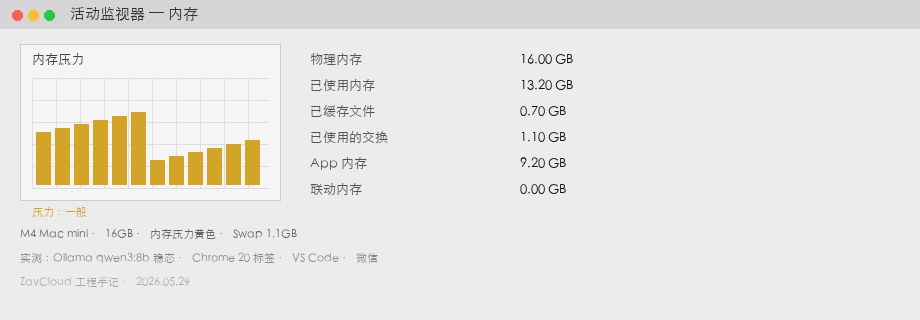
qwen3:8b steady state + Chrome / VS Code / Slack). 13.2GB used, 1.1GB swap, yellow pressure. Screenshot is illustrative — match your own Activity Monitor readout.M4 Mac mini 24GB — measured
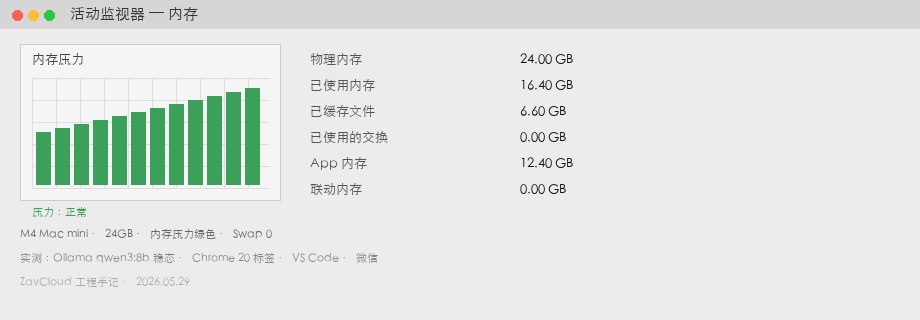
| Metric | Value | Notes |
|---|---|---|
| Memory Used | 16.4 GB | Same scenario, same model |
| Swap Used | 0 GB | Green memory pressure |
| Generation speed | 37 tok/s | Similar compute; gap mostly from swap |
| Headroom | ~7.6 GB free | Room for nomic-embed or a second 3B sidecar |
What “I picked wrong” actually means
16GB can run Ollama. My mistake was assuming my load was a lab single-task bench. If you mostly forward APIs and occasionally ollama run, 16GB is still fair. If your default desktop is browser + IDE + local Qwen3/DeepSeek + an agent, 24GB is insurance.
How we measured (reproducible)
Every table number below follows this pipeline. You can reproduce it in an afternoon on one machine:
- Weight size —
ollama show qwen3:8b --modelfileplus*.gguffile size on disk (disk ≠ resident RAM, but sets a floor). - Resident memory — After the model loads, Activity Monitor → Memory tab: record Memory Used / Swap Used / Memory Pressure (yellow vs green).
- Generation speed — Fixed ~512-token input prompt; read eval rate from
--verbose:
ollama run qwen3:8b --verbose \
  "Write about 400 words explaining Apple unified memory. Use three bullet points for pros and cons."
# Average eval rate (tokens/s) from three consecutive runs

vm_stat | awk '/swap/ {print}'
memory_pressure
Not modeled here: different Ollama builds and quant tags (Q4_K_M vs Q5) shift footprint by ~0.5–1.5GB. If you swap in Gemma 3 or DeepSeek R1 tags, pull locally and re-measure. The 14B rows below use the same method.
2026 models on M4 Mac mini — footprint reference
Legend: ✅ comfortable with daily multitasking; ⚠️ runs but swap-prone / close apps; ❌ not recommended as a daily driver. Assumes Chrome + IDE load from above, not a clean bench.
| Model (Ollama tag) | 16GB | 24GB | One-week notes |
|---|---|---|---|
Qwen3 8B qwen3:8b |
✅ | ✅ | 16GB: ~1.1GB swap; 24GB: zero swap |
DeepSeek R1 8B deepseek-r1:8b |
✅ | ✅ | Weights ~5.2GB; curve close to Qwen3 8B |
Qwen3 14B qwen3:14b |
⚠️ | ✅ | 16GB: 2.3GB+ swap — see next section |
| Gemma 3 27B (quant) | ❌ | ⚠️ | 24GB experiment only; longer context → OOM |
| Llama 3.2 3B | ✅ | ✅ | Good embed / RAG sidecar |
If you run the same weights through MLX, average footprint is similar to Ollama, but peaks are sharper — watch a 5-minute steady state in Activity Monitor, not just parameter count on the model card.
More benchmarks: 14B and DeepSeek (same environment)
Chrome, VS Code, and Slack/Teams stayed open; only the Ollama model changed:
| Model | RAM | Memory used | Swap | tok/s |
|---|---|---|---|---|
deepseek-r1:8b |
16GB | 13.5 GB | 1.0 GB | 33 |
deepseek-r1:8b |
24GB | 16.6 GB | 0 | 36 |
qwen3:14b |
16GB | 15.8 GB | 2.3 GB | 18 |
qwen3:14b |
24GB | 19.1 GB | 0 | 28 |
Bottom line: if Qwen3 or DeepSeek 14B is your daily model, 16GB fights swap constantly; 24GB keeps the browser and IDE open without a “close everything” ritual.
Theory vs measurement: where “14B Q4 ≈ 8–10GB” comes from
Blog posts that only cite “8–10GB” without sources read like LLM summaries. Here is the stack, aligned to qwen3:14b above:
- Weight files — After
ollama pull qwen3:14b, local GGUF is about 8.4–9.2GB depending on quant tag. Loaded resident RAM is usually slightly below file size (mmap + shared pages), not an order of magnitude smaller. - KV cache — At 8k context and batch=1, expect another 1–3GB; raising
OLLAMA_CONTEXT_LENGTHpushes 16GB machines over the edge faster. - Measured total — Same desktop,
qwen3:14bon 24GB: 19.1GB used = model-related footprint + KV + Chrome/IDE/system (~5–6GB). Model-only back-of-envelope is ~13–14GB, matching “8–10GB weights + a few GB runtime.”
So 14B Q4 can run, but not alongside a full dev desktop by default — upgrade to 24GB, or close tabs, shrink context, and move RAG embed jobs elsewhere.
Stacking Claude Code and OpenHuman: budget extra RAM
During the week I also tried two common 2026 “dev + local model” combos:
- Claude Code + local Ollama — Terminal agent on Anthropic API, Ollama for offline drafts or sensitive snippets. VS Code / Cursor adds 1–2GB plus Chrome; 16GB leaves almost no 14B headroom.
- OpenHuman +
qwen3:8b— Desktop agent and Memory Tree sync hold ~1GB+ in the background; see our OpenHuman install guide. On 24GB I could keep OAuth sync and 8B without swap. - MLX — With Xcode / Core ML pipelines, compile peaks can briefly max memory; good fit for a dedicated Cloud Mac node while a 16GB laptop stays the dev UI.
Large repos with CodeGraph + Claude Code MCP do not fill RAM by themselves, but you will resist closing Chrome — which nudges the machine toward 24GB (see CodeGraph local setup).
Buying decision (from measurements, not the spec sheet)
- Choose 16GB — Local 8B class only (Qwen3 / DeepSeek R1), OK with swap and occasional tab closing; or cloud Claude/GPT APIs with Ollama as backup.
- Choose 24GB — Default 14B + browser + IDE + agent; headroom for Gemma 3 27B experiments; planning to keep one machine 3–5 years without RAM as the first bottleneck.
This pairs with GPU cloud cost comparison: RAM tier answers “is one Mac comfortable,” cloud answers “24/7 and static IP.”
M4 Mac mini vs RTX 5060 desktop — how to choose
Most “local AI” searches are really comparing Apple unified memory (Mac mini / Mac Studio) vs NVIDIA VRAM (RTX 5060 build). ZavCloud sells Cloud Mac — dedicated macOS on M4 Mac mini — so this is not “never buy a GPU.” It is where each platform wins.
Mac Studio raises the RAM ceiling (64GB+); AWS / cloud GPU fits 70B full weights, training, and Stable Diffusion batches. The tables assume the same Chrome + IDE desktop as above.
Where M4 Mac mini wins
| Scenario | M4 Mac mini | Why |
|---|---|---|
| iOS / macOS development | ✅ | Xcode, TestFlight, device debugging — no RTX substitute |
| Claude Code / Cursor | ✅ | Terminal agent + local Ollama drafts; unified memory avoids “VRAM OOM” |
| Local AI (8B–14B text) | ✅ | Qwen3 / DeepSeek R1 8B–14B; 24GB can run 14B with zero swap |
| OpenHuman / MLX / Core ML | ✅ | Apple-stack inference; see Core ML Cloud Mac |
| AAA gaming / CUDA training | ❌ | Not the design target |
Where RTX 5060 wins
| Scenario | RTX 5060 PC | Why |
|---|---|---|
| PC gaming | ✅ | Discrete GPU + Windows ecosystem |
| Stable Diffusion / ComfyUI | ✅ | CUDA plugins and model hub; Mac works but ecosystem is thinner |
| 70B class models (quant) | ✅ | 12GB VRAM + system RAM stacking; 24GB Mac mini only ⚠️ for 27B trials |
| Multi-GPU / training | ✅ | Upgrade path to 5070 Ti, dual GPU, or cloud GPU; no CUDA on Mac |
| App Store shipping | ❌ | Still need a Mac; common pattern: RTX for images + Cloud Mac for signing |
Hybrid setup (what we see most among Cloud Mac customers)
Local or Cloud Mac (24GB) for Ollama / Claude Code / iOS; RTX or cloud GPU for SD and 70B. If a 16GB Mac mini is swap-bound, move 14B to a 24GB Cloud Mac for a week before buying more hardware. Billing context: M4 inference vs GPU cloud.
Try before you buy: run your load for a week
If you are still torn between 16GB and 24GB, this sequence worked better for me than guessing from Apple’s configurator:
- List software you will not close (tab count, IDE, Slack/Teams, agents).
- Run Qwen3 8B and 14B for 30 minutes each with the commands above; log swap and tok/s.
- If 14B keeps swap above 1GB, drop 16GB from the short list.
No hardware yet? Rent the same Apple Silicon config in the cloud, deploy your Ollama workflow, knowledge base, and agents, and watch memory curves for a week — usually cheaper than guessing RAM at checkout.
We operate M4 Mac mini Cloud Mac hosts daily; a frequent pattern is 16GB laptop for dev + 24GB cloud for Ollama / OpenHuman always-on. ZavCloud offers dedicated M4 Mac mini instances (native macOS, static IP) for pre-purchase stress tests, not to replace your judgment. Details: Cloud Mac plans.
- Further reading — M4 inference vs GPU cloud · OpenHuman × Ollama · Claude Code + CodeGraph
FAQ
Answers match the measurement tables above so you can reproduce them side by side.
How much RAM does Qwen3 14B need?
With the same desktop load as this article (~20 Chrome tabs, VS Code, Slack/Teams), qwen3:14b steady state is ~19.1GB used on 24GB; on 16GB you see ~15.8GB used plus 2.3GB swap. Model-only: GGUF weights ~8.4–9.2GB plus KV and OS overhead — practical minimum is 24GB unified memory; 16GB only works if you close the browser and lower OLLAMA_CONTEXT_LENGTH.
Can DeepSeek R1 14B run?
deepseek-r1:8b is fine on 16GB (swap ~1GB, 33 tok/s), same class as Qwen3 8B. 14B tier tracks qwen3:14b: 24GB → zero swap (~28 tok/s); 16GB swaps hard and drops toward ~18 tok/s. It runs, but 14B as a daily driver wants 24GB.
Is 16GB becoming obsolete?
Not overnight. In 2026 the default load is browser + IDE + resident 8B + an agent, not occasional ollama run. 16GB still fits 8B inference, API-first workflows, willing tab discipline. If you live in Claude Code / OpenHuman without “close everything” days, 16GB feels like entry tier, not comfort tier.
How many years will 24GB last?
At today’s 8B–14B main models (27B for experiments), ~3–5 years is still the sweet spot for desktop + local agent: room for 14B, an embed model, and dev tools. Beyond that (32B+ resident) plan Mac Studio or cloud GPU — Mac mini RAM is not upgradeable after purchase.
Ollama vs MLX — which uses less memory?
Daily chat: Ollama is easier to reason about. GGUF + resident process footprint matches Activity Monitor in this article. MLX spikes higher when loading, compiling, or running beside Xcode — average may be similar, but swap spikes hurt more. Default Ollama for chat/RAG; MLX for batch jobs or a dedicated node.
Mac mini vs RTX 5060 for local AI?
Text 8B–14B, Claude Code, iOS: M4 Mac mini (24GB recommended). Unified memory and macOS tooling are the moat. Stable Diffusion, 70B quant, gaming: RTX 5060. CUDA ecosystem is not replaceable on Mac mini. Most teams end up with both, not either/or.
Is 16GB enough for Qwen3 8B?
Yes. We measured 13.2GB used, ~1.1GB swap, 34 tok/s with yellow pressure. Accept occasional stutter → 16GB; want zero-swap desktop → 24GB (16.4GB used, 37 tok/s).
How much faster is 24GB for Ollama?
Same qwen3:8b: only ~9% (34 vs 37 tok/s). The win is zero swap, stacking 14B, and a second small model — not 2× raw speed.
Can Gemma 3 27B run on 24GB Mac mini?
⚠️ Heavy quant experiments only; longer context tends to OOM. 8B–14B is the 24GB comfort zone; 27B as a daily driver belongs on RTX or cloud GPU.
Is Mac Studio worth it for AI?
For 8B–14B plus development, M4 Mac mini 24GB is better value. Move to Mac Studio when you need 64GB unified memory, multiple 14B/32B streams, or heavier MLX pipelines — or validate curves on Cloud Mac first.
Not sure which RAM tier to buy?
Run 8B and 14B for 30 minutes each with the commands above and watch swap. No machine yet? Rent a matching M4 Mac mini Cloud Mac (24GB), deploy Ollama / OpenHuman, observe a week, then buy metal — usually cheaper than guessing or buying RTX first.
Can I reproduce your numbers?
Yes. On Ollama 0.12.x with the same Chrome/IDE/Slack scenario, absolute values may differ ±10%, but 16GB swaps, 24GB does not, 14B wants 24GB should hold.
Field notes
Not sure on RAM? Run your load for a week first
Mirror this article: Chrome, IDE, qwen3:8b / qwen3:14b, log swap and memory pressure. For a production-like dedicated macOS environment, ZavCloud M4 Mac mini Cloud Mac is built for pre-purchase validation.