As an AI developer in 2026, you face an increasingly concrete hardware decision: buy an M4 Mac mini for your desk, or rent a Cloud Mac on demand? This isn't a binary choice — it's an engineering decision that depends on your usage patterns, team size, and budget structure.
This article breaks down both options across five dimensions and concludes with a practical 7-step decision matrix.
Why This Question Matters More in 2026
Apple Silicon fundamentally changed the AI workstation landscape. The M-series chip's Unified Memory Architecture (UMA) lets the CPU and GPU share the same memory pool, making it possible to run local large language models on consumer hardware.
Key data points:
- M4 Mac mini 16GB: approximately $599 USD
- ZavCloud Cloud Mac M4 16GB: approximately $5.50/day (monthly ~$124/month)
- Break-even timeline for a local Mac mini: approximately 5–12 months depending on usage frequency
Core insight: If you use it more than 22 days per month, buying local hardware is more economical than renting. Below that threshold, Cloud Mac's flexibility has higher value.
Hardware Specification Comparison
Compute Units
| Spec | M4 Mac mini 16GB | M4 Mac mini 24GB | Cloud Mac M4 |
|---|---|---|---|
| CPU Cores | 10 | 10 | 10 |
| GPU Cores | 10 | 10 | 10 |
| Unified Memory | 16 GB | 24 GB | 16–24 GB |
| Neural Engine | 38 TOPS | 38 TOPS | 38 TOPS |
| Memory Bandwidth | 120 GB/s | 120 GB/s | 120 GB/s |
Storage and Network
| Spec | Local Mac mini | Cloud Mac |
|---|---|---|
| SSD | 256GB–2TB (local) | 256GB–2TB (dedicated) |
| Network | Home broadband (10–100Mbps) | 1Gbps backbone direct |
| Upload bandwidth | Usually ≤ 20Mbps | 1Gbps symmetric |
Local AI Inference Benchmarks
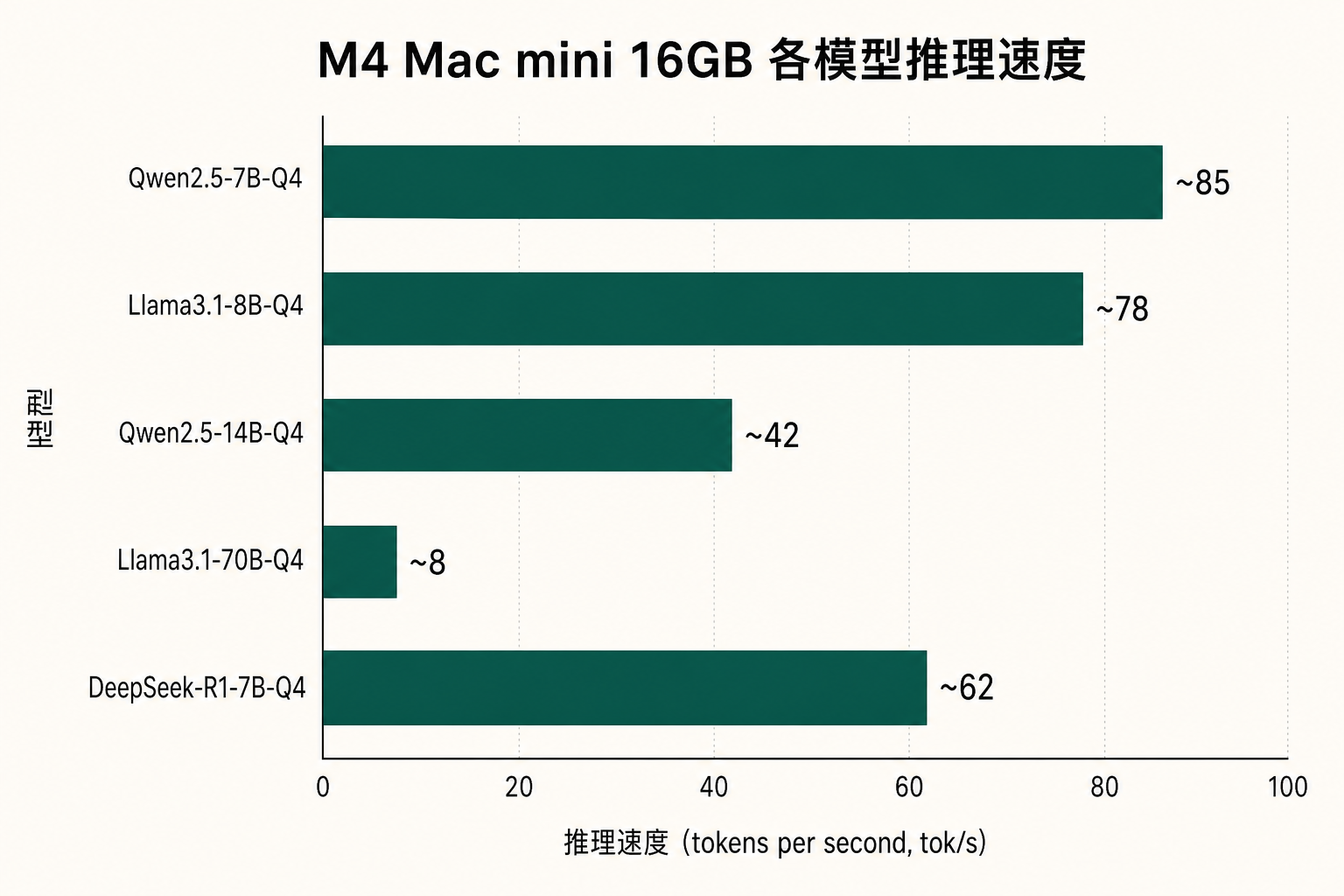
Running common models on M4 Mac mini 16GB with Ollama, measured token generation rates:
# Test commands
ollama run llama3.2:7b-instruct-q4_K_M
ollama run --verbose llama3.2:7b-instruct-q4_K_M "Explain Transformer architecture"
Measured results (tokens/second):
| Model | Quantization | Memory Usage | M4 16GB tok/s |
|---|---|---|---|
| Llama 3.2 7B | Q4_K_M | ~4.5 GB | 62 tok/s |
| Qwen2.5 14B | Q4_K_M | ~9.5 GB | 34 tok/s |
| DeepSeek R1 14B | Q4_K_M | ~9.5 GB | 31 tok/s |
| Qwen2.5 32B | Q4_K_M | ~20 GB | 14 tok/s |
Note: 32B models on a 16GB machine will trigger swap, causing actual performance to drop to ~8 tok/s. Strongly recommend 24GB or higher for 32B+ models.
Cost Structure Deep Dive
5-Year Total Cost of Ownership (TCO)
For a full-time iOS/AI solo developer typical use case:
-
Local M4 Mac mini 16GB Route
- Hardware purchase: $599 (one-time)
- Electricity: ~$2–4/month (Mac mini idle draws only 6W)
- 5-year total cost: ~$720 -
Cloud Mac Route (monthly)
- Monthly subscription: $124/month × 60 = $7,440
- On-demand elasticity: spin up extra instances during peak, save during slow periods
Conclusion: For long-term full-time use, local hardware is far cheaper. Cloud Mac's value is in elasticity and zero upfront investment.
Hidden Cost Checklist
Don't overlook these hidden costs:
- Local machine: home broadband upload bandwidth bottleneck (limited when pushing large projects to GitHub)
- Cloud Mac: data transfer costs (usually included in monthly subscription)
- Local machine: upgrade costs (will need to repurchase when M5 arrives)
- Cloud Mac: account management and permission configuration overhead
Four Core Use Case Analysis
Scenario A: Personal Local AI Experiments
Recommended: Local M4 Mac mini 24GB
Reason: Long continuous local model runs, latency-sensitive, high all-day usage frequency. 24GB memory can run 14B models + development toolchain simultaneously without triggering swap.
Scenario B: iOS Team CI/CD
Recommended: Cloud Mac (dedicated Runner)
Reason:
- Need concurrent multi-PR builds
- Don't want to tie up personal dev machine
- Scale on demand (spin up extra instances during release cycles)
Scenario C: Hybrid Development (Cursor + Claude Code)
Recommended: Local Mac mini + Cloud Mac combination
Reason: Use local machine for daily coding, start Cloud Mac for dedicated runners or long-running tasks. Costs complement each other.
Scenario D: Occasional Development Needs
Recommended: Cloud Mac daily rental
Reason: When monthly usage is under 10 days, daily rental ($5.50/day) is more sensible than owning hardware.
Technical Configuration Comparison
Local Mac mini Standard Development Environment
# Install Homebrew
/bin/bash -c "$(curl -fsSL https://raw.githubusercontent.com/Homebrew/install/HEAD/install.sh)"

# AI development toolchain
brew install ollama           # Local LLM runtime
brew install python@3.12      # Python environment
pip install mlx-lm            # Apple MLX framework

# Start Ollama service
ollama serve &
ollama pull llama3.2:latest
Cloud Mac Quick Access
# SSH direct access (SSH key pre-configured)
ssh user@your-cloud-mac.zavcloud.com

# Verify environment
system_profiler SPHardwareDataType | grep "Memory:"
# Output: Memory: 16 GB

# Run local model immediately
ollama run qwen2.5:14b "Hello from Cloud Mac"
Key Limitations and Caveats
Local Mac mini Limitations
- ~~Cannot expand memory remotely~~ (unified memory is soldered, non-expandable)
- ~~Not suitable for multi-user simultaneous access~~ (single-user system)
- Power outages or network interruptions will cut off all running tasks
Cloud Mac Limitations
- ~~Cannot access local peripherals~~ (USB, Bluetooth devices)
- Requires network connection (disconnecting breaks your work session)
- Privacy-sensitive code should not be uploaded to cloud environments
Glossary
- Unified Memory Architecture (UMA)
- Apple Silicon's memory design where CPU, GPU, and Neural Engine share a single physical memory pool, eliminating traditional PCIe memory copy overhead — the foundational reason for efficient local AI inference.
- tok/s (tokens per second)
- Standard metric for measuring LLM inference speed. Higher values mean faster response generation. Generally >30 tok/s provides a good interactive experience.
- Quantization
- Technology that compresses model weights from FP16/FP32 to lower-precision formats (like Q4_K_M), dramatically reducing memory usage and inference latency at acceptable accuracy cost.
- SWAP Trigger
- When model size exceeds physical memory, macOS writes some data to SSD as virtual memory. SSD read/write speed is far lower than RAM, causing significant inference slowdown (typically to 1/5 or less).
Further Reading
More related articles:
- M4 Mac mini Ollama Benchmarks: 7B/14B tok/s and swap thresholds
- GitHub Actions Self-hosted Runner: Cloud Mac Configuration Guide
- CoreML vs Ollama: Apple Silicon Local Inference Framework Comparison
Decision Reference Diagram
Advanced Tips
M4 Mac mini Performance Tuning: Memory Pressure Monitoring and SWAP Alert Setup
When running large models, monitor memory pressure:# Check real-time memory pressure
memory_pressure
# Monitor with iStats
gem install iStats
istats all
Cloud Mac Multi-instance Concurrency: GitHub Actions Matrix Build Configuration
# .github/workflows/build.yml
strategy:
  matrix:
    os: [macos-latest]
    xcode: ["15.4", "16.0"]
  max-parallel: 4  # Cloud Mac scales on demand
7-Step Purchase Decision Matrix
Work through these steps in order:
- Assess usage frequency: Monthly usage ≥ 22 days → consider buying local hardware
- Assess memory requirements: Need to run 32B+ models → must have 24GB or more
- Assess team size: 2+ people sharing → Cloud Mac fits better
- Assess network environment: Upload bandwidth < 100Mbps → Cloud Mac compensates
- Assess task type: Need concurrent CI/CD Runners → Cloud Mac dedicated nodes
- Assess budget structure: Cannot invest upfront → Cloud Mac daily rental
- Assess data privacy: Highly sensitive code → prioritize local machine
Summary
Key conclusion: There is no absolutely optimal choice — only the choice that best fits your current stage.
For most full-time AI solo developers, the recommended path is:
- Starting phase (< 3 months, exploring AI dev): Cloud Mac on-demand rental, zero hardware investment
- Stable phase (committed direction, daily use): Buy M4 Mac mini 24GB local machine
- Team phase (2+ people, need CI/CD): Local machine + Cloud Mac Runner combination
Choose hardware to serve your engineering goals, not hardware for its own sake.
ZavCloud Developer Infrastructure
Try a Dedicated Cloud Mac Today
Dedicated M4 Mac mini instances, rent by the day — no hardware purchase required
1Gbps backbone direct connection, zero-config SSH and remote desktop