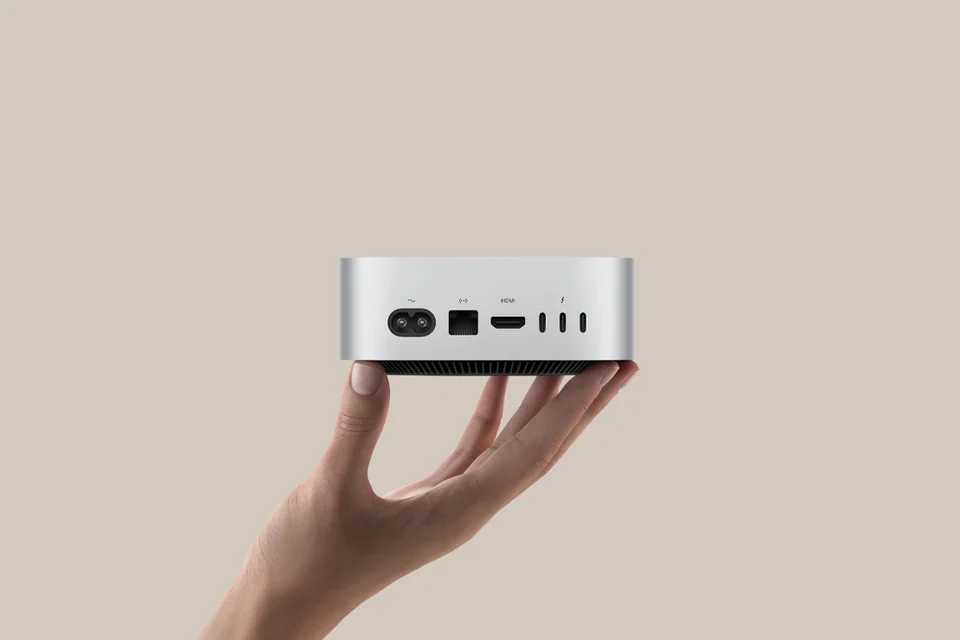
Compute & network
Run Xcode builds, Fastlane archives, batch inference, and remote desktops on a data-center M4. Dedicated IPv4 and 1 Gbps — choose the nearest node in Hong Kong, Tokyo, Singapore, US East, and more.
Mac mini Cloud · Cloud macOS · ZavCloud
Mac mini rental · iOS development · remote desktop · CI/CD
Inside the data center —genuine macOSanddedicated Mac mini M4 cloud instance:IPv4+ up to1Gbps, withVNC remote desktopand SSH. Choose from Hong Kong, Tokyo, Singapore, Seoul, US East, and more — rent by the day, week, month, or quarter,online. Pay first, log in later.
First confirm that the compute and network match your use case, then choose a billing cycle and region. Details are governed by the plan description and pricing page.
Run Xcode builds, Fastlane archives, batch inference, and remote desktops on a data-center M4. Dedicated IPv4 and 1 Gbps — choose the nearest node in Hong Kong, Tokyo, Singapore, US East, and more.
Daily or weekly billing suits load testing and short-term projects; monthly or quarterly is ideal for persistent CI and collaborative desktops. Order without logging in first — payment is linked to your account automatically.
Go to pricingOrder → Pay → Ticket → Provision. SSH and VNC are in the console; power operations go through a ticket.
Connection guideChoose a data center based on where your users and team are located to reduce remote desktop and network latency. Availability and inventory are confirmed on the pricing page.
Coverage across Asia-Pacific and US East backbone. New region additions are announced on-site and via ticket replies.
Compare configurations carefully: choose daily/weekly for short validation sprints, monthly/quarterly for persistent builds and collaborative desktops. Prices below are on-site display figures; the live price on the pricing page at checkout time is authoritative.
Solo dev · Lightweight automation · Primarily SSH / scripting
Teams · CI · Multi-task and multi-user SSH on one machine
Cost & flexibility
No upfront investment in a Mac Mini M4 or colocation: break capacity into instances by project, pay by cycle, keep peak compute in the data center, and keep exploration local. The notes below represent common planning approaches; actual TCO varies with tax rates, depreciation, and idle usage.
Three excerpts, three scenarios: offloading heavy workloads that monopolize your laptop to a data-center Mac; giving each app repo its own Mac for packaging and release; and having a distributed team connect to the same cloud Mac screen in the region closest to them. These are paraphrased from internal alignment discussions — see if your situation sounds familiar.
AI · Inference & batch tasks
We run inference services and overnight batch processing on a Mac mini (M4) in a cloud data center. Model files and the runtime environment stay fixed on that cloud machine; my own laptop is only used for editing code, reading logs, and writing quick scripts. Before, when running long tasks locally, filling up memory would slow down local dev tools and destabilize video calls. Since moving the heavy work to the cloud machine, my laptop basically no longer fights inference for the same memory.
We still run regression tests with the same sample set before each release — no shortcuts there. Our rough cost split: tasks that run for a long time and peg the machine go to the cloud; phases that involve frequent code changes and parameter tuning stay local, to avoid shuttling multi-GB model files back and forth.

Builds · CI & certificates
For iOS releases, we assign a dedicated cloud Mac to each Git repo, using Fastlane for signing and creating archives. Each cloud machine holds only that repo's certificate, provisioning profile, and config files — avoiding the situation on a shared build machine where "someone else's private key ends up in the system keychain and nobody knows who signed what".
Multiple release pipelines can run in parallel without competing for the same build machine. Certificates and private keys still live in the team's central vault and are provisioned to the relevant cloud machine at build time. The cloud Mac solves the "who uses which environment" isolation problem; auditing, rotation, and access controls are still your own team's responsibility.

Cross-border · Collaboration & releases
With design in Singapore and dev/ops in Hangzhou, for UI reviews and walkthroughs we have everyone connect on a large screen to the same cloud Mac in the data center closest to the design team, viewing the same native macOS display via VNC. This way everyone takes a shorter network path, which is usually smoother than remotely controlling a colleague's personal machine in Singapore from Hangzhou — though latency still depends on the connection and time of day, and can still lag during peak hours.
Release timing no longer requires the whole team to be on call in the same timezone. Network quality, data compliance, and vendor ticket commitments are still things you need to verify before ordering. We've documented a "city/team ↔ preferred data center node" reference chart internally so new hires don't have to keep asking which region to connect to.

About Mac mini cloud hosting, remote desktop, and development environments. More how-to guides in theHelp center.
Yes. On thepricing pageselect a node, hardware model, and billing cycle to place an order. After provisioning, connect to acloud macOS environmentvia VNC remote desktop or SSH from the console — no physical Mac required.
Yes. Connect from Windows or any other OS via your browser to acloud Macand use the full Xcode toolchain for building, signing, and debugging — ideal for indie developers or small teams getting started on Apple platform projects quickly.
Yes. Install and register aself-hosted runneron your dedicated Mac mini instance, working alongside Jenkins, GitLab CI, Fastlane, and other pipelines for a stable Apple Silicon build environment.
After provisioning, go toMy Accountand openVNCto view the graphical interface, or useSSHfor command-line and automation tasks. See theRemote accessguide for connection steps.
Genuine macOS, dedicated M4, and data center networking — from CI compilation to App Store distribution to AI batch tasks, all in one consistent environment.
Run the full Xcode toolchain in the cloud: a genuine macOS environment where signing and debugging more closely mirror production. Operate remotely via SSH or VNC, with dedicated IPv4 and 1 Gbps bandwidth for smooth artifact uploads and dependency syncing.
Manage provisioning profiles, certificates, and archive workflows in a stable, auditable release environment. For multi-project teams, use separate instances per project to isolate environments and avoid certificate or config conflicts.
No need to share a runner — run Jenkins, GitHub Actions, GitLab CI, or Fastlane on your dedicated Mac mini M4. The build and script environment lives in the data center; your team just pays by the billing cycle.
XCTest, UI automation, and multi-version simulator testing — ideal for fixing a test baseline on a dedicated machine. Power operations and long-running tasks should still go through the console and tickets.
Design, product, and backend teams in different time zones can review UI via VNC. Cross-border teams can pick a nearby data center node to reduce remote desktop latency.